SwAS git · main
SwAS - app switcher for sway (SVG/PNG icons, themeable)
C 97.5% Markdown 1.6%git clone https://git.christianimmanuel.de/sway/SwAS.gitwget https://git.christianimmanuel.de/sway/SwAS/archive/SwAS.tar.gzswas
Sway App Selector: a radial app launcher, drawn with SDL3. Apps sit in wide slots across the top arc; point at one and click, or type to filter. Works on Wayland and X11.
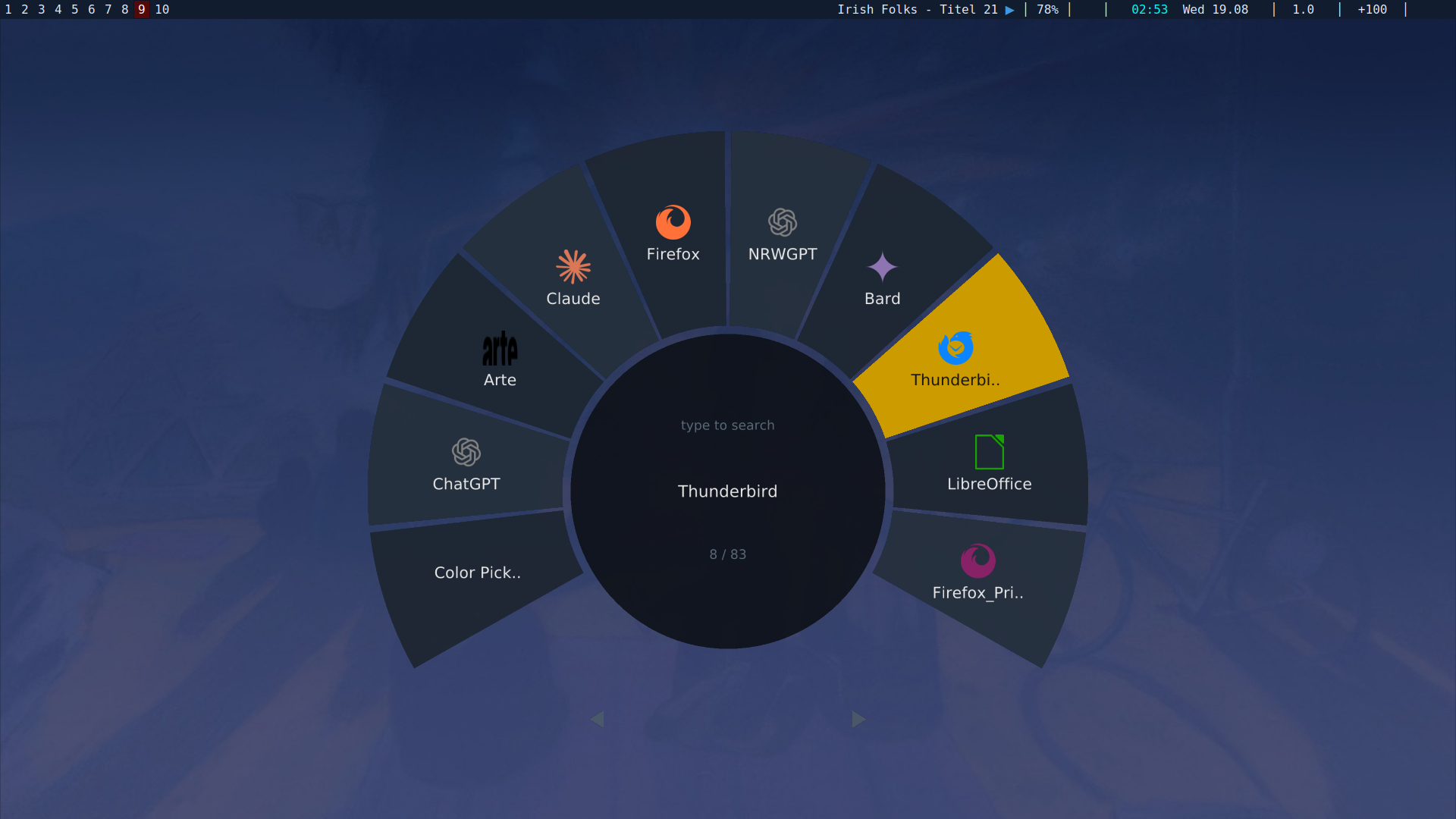
100% vibecode, but tested.
Build
Debian trixie and newer:
sudo apt install build-essential pkg-config libsdl3-dev
make
sudo make install     # /usr/bin, examples in /usr/share/swas
make config           # optional: write a default config to ~/.config/swas/config
make link             # or: config -> the installed example, kept in sync
make static bakes SDL3 into the binary, so it runs without libSDL3.so. It
needs libSDL3.a, which distro packages do not always ship.
On bookworm the SDL3 package does not exist yet; build SDL 3.2+ from source and
set PKG_CONFIG_PATH.
Needs any TTF font. Icons need a .desktop file and an icon theme.
Use
bindsym $mod+space exec swas
for_window [app_id="swas"] floating enable, border none| key | action |
|---|---|
| move the pointer over the top arc | highlight a slot |
| bottom left / right | page back / forward — the further out, the faster |
| scroll | move the list under the fixed highlight |
| type | filter by name |
enter, left click | launch |
tab / shift+tab, arrows | next / previous slot |
esc | clear the filter, else quit |
| right click | quit |
Apps are read from the .desktop files in the usual directories. The one you
used last sits at the top of the arc, under the pointer, and distance from the
top is how long ago you used it — second to the right, third to the left,
fourth to the right, and so on. Past the end of the history the rest carry on
outwards in alphabetical order:
history: firefox foot code gimp mpv, then the alphabet

darktable  blender  mpv  code  [firefox]  foot  gimp  ardour  calibre
center_first=0 fills the arc from the left instead. Every launch is written
to ~/.cache/swas/history.
swas --list                       # every id, name and resolved icon
swas include=firefox,code,gimp    # a curated wheel, in that order
swas --dmenu < items              # a dmenu-style picker on stdin/stdout
In scripts written for dmenu or bemenu, MENU=swas works as it is: dmenu's own
flags (-l 10, -p "", -i, ...) switch on dmenu mode and are otherwise
ignored. Blank lines in the input are skipped. Cancelling exits non-zero, like
dmenu.
Drop onto a workspace
Drag an app out of the wheel and let go over a workspace: it starts there, while you stay where you are. As you drag, the wheel shrinks to about a hundred and thirty pixels across and stays where it is, out of the way of what you are aiming at. It is scaled, not redrawn — the same picture, just small — and it stays open afterwards, ready for the next one.
Letting go over the wheel itself cancels — nothing opens, and the workspace
underneath it is never picked up by mistake. A ring around the wheel says so
while you hover there. esc and right click cancel too.
While it is small it sits on a disc of its own (drop_bg), so it keeps an
edge against a busy overview instead of reading as a handful of loose marks.
When an app does not appear, swas says so under the wheel for a few seconds:
could not start Firefox if the launch itself failed, Firefox did not start
if the process was gone a second and a half later — a typo in a .desktop
file, a missing binary, something that exits on startup. It stays quiet for
anything that is merely slow.
drop_assign=0 opens the app on the workspace you are on and moves it after,
instead of assigning it first. Assigning is tidier — sway puts the window
straight where it belongs — but it means the app maps on a workspace that is
not on screen, and a toolkit that reads its scale from the output it lands on
has no output to read. GTK and WebKit do that, and come out at scale 1 on a
scaled screen, which looks like everything is too big.
drop_size is that width in pixels, which is what you actually want to say
rather than a fraction of a screen you have to work out; drop_size=0 falls
back to drop_shrink as a fraction. drop_corner moves it out of the middle
— top-left, top-right, bottom-left, bottom-right, or center.
Grey outlined tiles are numbers that have no workspace yet — drop on one and sway makes it.
With the overview behind it
overview=1 puts the real thing back there instead of the tiles: swov, drawn
underneath, showing every workspace with the windows already in it.
bindsym $mod+space exec swas --replace overview=1

no_focus [app_id="swov-backdrop"]
for_window [app_id="swov-backdrop"] floating enable, border none
for_window [app_id="swas"] floating enable, border none
The app id changed with the name, so any rule of yours saying app_id="appwheel"
needs updating. The config and history move too — ~/.config/swas/config and
~/.cache/swas/history — but the old appwheel ones are still read when the
new ones are absent, so nothing is lost by not moving them.
no_focus is a command in its own right and takes the criteria as its
argument — it is not something you put after for_window. Written the wrong
way round it fails silently at load and the backdrop takes your keyboard.
Started by swov (its d key), swas talks to that overview instead of
bringing up its own: the wheel appears in front of it, and closes again after
one drop, leaving the overview where it was. That is what SWAS_OV_IN and
SWAS_OV_OUT in the environment mean.
--replace closes a wheel that is already open before starting, so pressing
the binding twice gives you one wheel rather than two stacked on each other.
The no_focus line matters. Without it sway hands the keyboard to the backdrop
the moment it appears and the first letters you type are lost.
If something looks wrong, run it from a terminal with overview_debug=1:
every line between the two, and swov's own complaints, go to stderr.
The backdrop maps on top of the wheel — on Wayland a window cannot lift itself
back — so swas asks swov to restack it as soon as that window is up. If
you ever end up with a wheel that ignores the mouse, that is what went wrong;
esc still closes it, and overview=0 falls back to the plain tiles.
Drop it against the edge of a workspace and it opens beside everything already there — left of a column of two windows, not left of the top one. Drop it on an empty part of a workspace and it lands at the end of the layout. Drop it on the left or right edge of a window already there and it opens beside it, splitting horizontally; the top or bottom edge splits vertically. A bar shows the edge before you let go, the same one swov draws when you drag a window inside it. That way a workspace can be filled with a few apps in the arrangement you want without touching any of them afterwards.
The app is placed before it opens, not moved after: swas hands swov the
pid the moment it launches, and swov puts an assign rule in sway's way while
the process is still starting. Nothing flashes onto the workspace you are on.
The wheel stays open and in front through all of it, even though each new
window takes the focus as it opens, so you can fill several workspaces in one
go and then pick one to switch to. The one catch is dropping on the workspace
you are already on: the app opens behind the wheel, so you will not see it
until you close it. drop_close_here=1 closes the wheel in that case.
swas starts it only after its own first frame is on screen, and swov fades in from nothing, so picking an app straight away shows no flicker at all — you never see it arrive. While you drag, the wheel shrinks and the workspace under the pointer takes the selection cursor. Let go and the app starts there.
Nothing of the wheel's own is drawn over the overview while it is up — no
second scrim on top of swov's — and the overview is drawn soft while you are
still choosing an app, sharpening as soon as you start dragging — set blur in swov's own config.
The two talk over a pipe, one line each way: swas sends the pointer as a fraction of the screen, swov answers with the workspace under it. Closing the wheel closes the pipe, and the backdrop fades out and leaves.
This needs swov on PATH: swas asks it for the
workspace list and hands it the launched process, which swov follows until its
window appears and then moves. Without swov the feature is simply off. Set
drop_focus=1 to follow the app to its workspace instead of staying put.
make install also drops the shipped examples in /usr/share/swas/.
make link points your config at one of them, so the next install is the
config you are running — handy if you want to follow the examples rather than
keep your own copy. Edits you make there are overwritten on install.
Config
${XDG_CONFIG_HOME:-~/.config}/swas/config, key=value, # comments.
Every key is also a command line option:
swas slots=8 arc=220 icons=0
swas --ui_scale=1.3 --icon_px=56
swas --dump-config prints the whole set with defaults. A # after
whitespace starts a comment, so the annotated lines that command prints can be
kept as they are. The ones worth
knowing:
| key | |
|---|---|
slots | how many apps the arc holds at once |
arc | degrees of the ring used for apps; the rest is the paging zone |
radius, y_offset | wheel size and where it sits |
ui_scale | scales all text at once |
ssaa | supersampling 1–4 |
icons, icon_px | .desktop icons and their size |
sort | recent or alpha |
include, exclude, dirs | which apps show, and in what order |
launcher, terminal | how an Exec= line is run |
bg | the scrim over the desktop; 0d111700 for none |
close_on_focus_loss | 1 = quit when another window takes focus |
drop | drag an app onto a workspace; 0 = off |
overview | 1 = swov behind the wheel instead of the plain tiles |
overview_debug | 1 = print the backdrop conversation to stderr |
drop_close_here | close after a drop on the current workspace; 0 = stay |
drop_shrink, drop_ms, drop_px | how the wheel gets out of the way |
drop_size | how wide the wheel is while dragging, in px; 0 = use drop_shrink |
drop_bg | the disc behind it while it is small; alpha 00 for none |
drop_corner | where it sits then: center, top-left, top-right, bottom-left, bottom-right |
drop_focus | 1 = switch to the workspace the app landed on |
swov | the binary asked about workspaces |
Shared config
Colours and fonts for swas, swov and swbr can be set once in
${XDG_CONFIG_HOME:-~/.config}/sw/config, using role names (surface,
accent, hl, ...) that each program maps onto its own keys. sw_theme.h
lists them all.
Keys written before any section go to all three programs; a [swas]
section goes to swas only and takes its own key names as well. The config
above is read afterwards, so it always wins, and the command line wins over
that.
Notes
- The window is mapped and focused before the
.desktopscan and the font - "Fullscreen" is a borderless window the size of the display, not exclusive
- Apps whose
.desktopfile saysTerminal=trueare run insideterminal=. - SVG icons are rasterised at the size they are drawn, so they stay sharp at
load, so anything typed while it starts is queued by the compositor instead of being lost.
fullscreen: that would make the surface opaque and flicker the mode on close.
any icon_px.